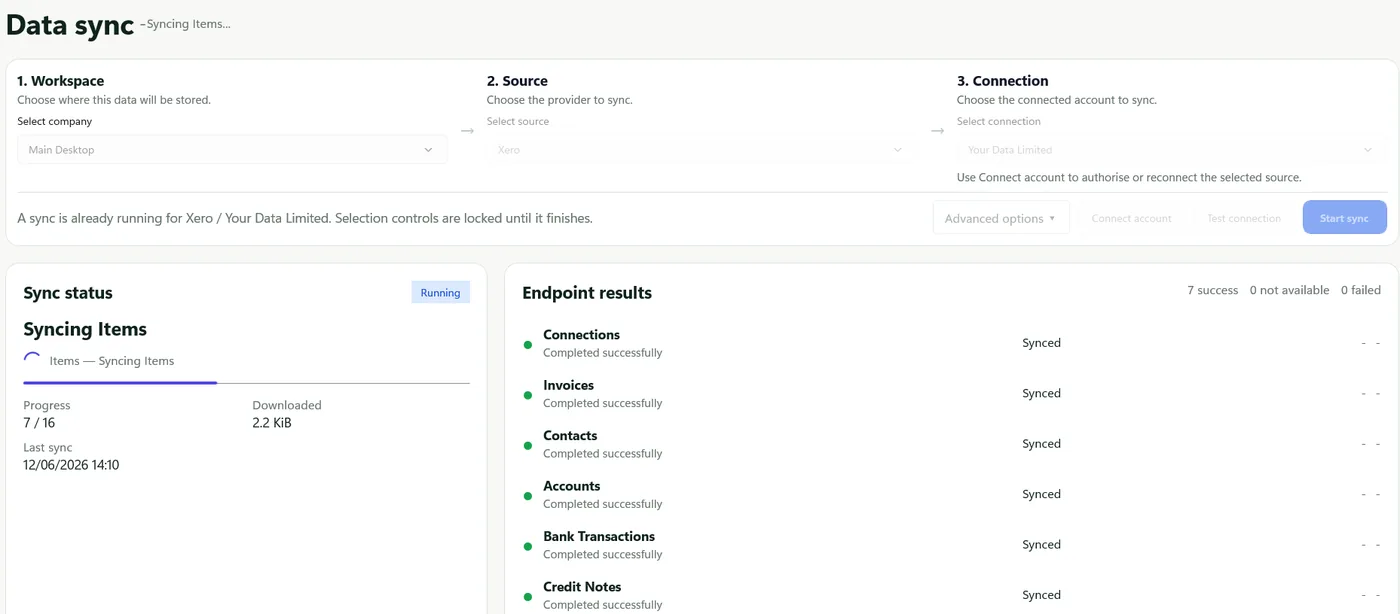
Endpoint results
Check completion, empty results, skipped endpoints and source-specific errors.
Datplan help
Use API Pull to choose the exact workspace, source and provider connection, then review what completed before relying on the refreshed reporting data.
Run choices
Uses the saved position or checkpoint where supported, requests the required updates and preserves a repeatable routine reporting workflow.
Requests a clean source rebuild. It can consume more Datplan allowance and provider quota, so use it when a full refresh is genuinely needed.
After the run
Check completion, empty results, skipped endpoints and source-specific errors.
Review the overall state, downloaded volume, start and finish information and any warning notes.
Use available source and transformed row summaries to identify unexpected gaps or exclusions.
Export the sync report or diagnostic ZIP when support requests it. Inspect and sanitise anything shared.
Sync questions
Open API Pull, choose the workspace and source, then select Connect account. Complete the provider’s browser sign-in and consent, return to Datplan, and select the confirmed connection.
It refreshes the selected source and uses an incremental checkpoint where that source endpoint supports one. The page shows progress, endpoint results, downloaded volume and run notes.
Use a full re-pull when local data is stale or incomplete, the source shape changed materially, or support recommends a rebuild. Routine work should normally use the standard sync.
Review completion status, each endpoint result, run notes, reconciliation output and the timestamp of the local data before using it in a report.
The Windows app is free to download and includes Datplan Demo data, so you can test sync, dashboards, reporting grains and exports first.