Full and incremental sync
Use checkpoints where the provider and endpoint support them, while retaining a full re-pull option when a clean rebuild is needed.
Understand sync modes →Product features
Extract supported accounting and CRM data on Windows. Turn raw records into structured tables and models, then use Excel or your BI tools, create custom dashboards, or open Datplan’s ready-made browser reports.
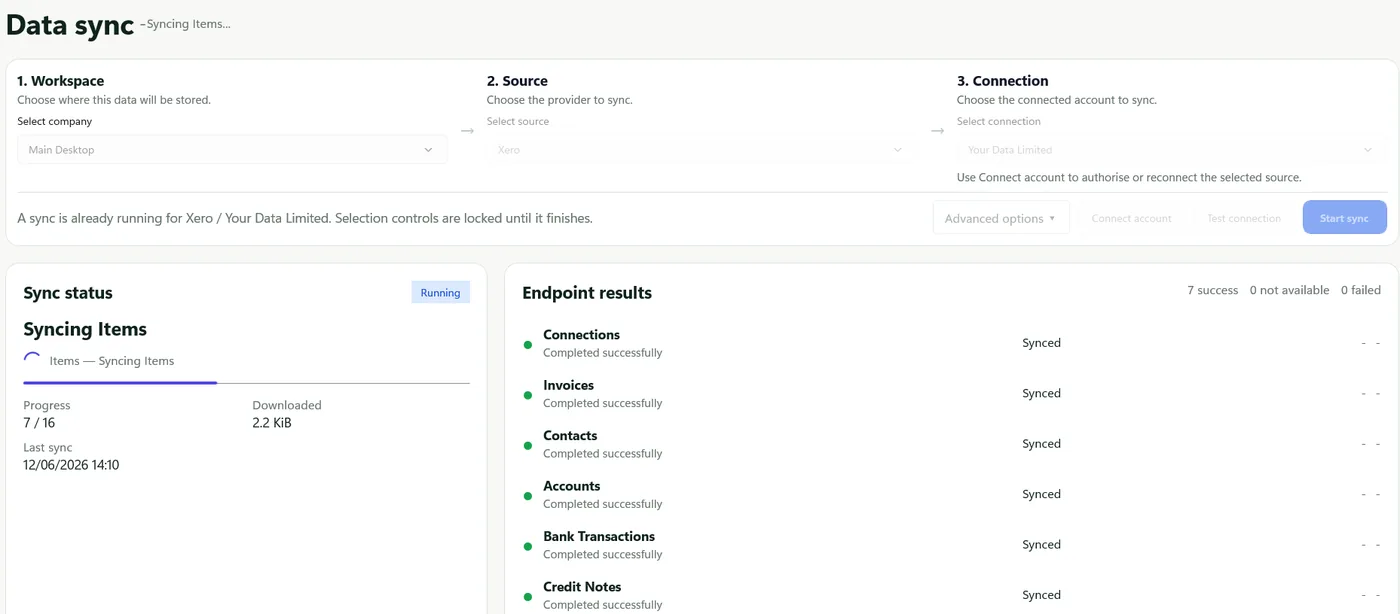
Sync with evidence
A reporting refresh should leave enough information to understand success, partial results, limits and failures.
Reporting layers
Use checkpoints where the provider and endpoint support them, while retaining a full re-pull option when a clean rebuild is needed.
Understand sync modes →Open supplied source-specific reports, KPIs and calculations on desktop, tablet or phone. Use completed DataPull files locally or share them through authorised Microsoft folders.
Try the reporting suite →Create saved dashboards with KPIs, charts, tables, maps, gauges, filters, headings and notes. Lock a finished layout and export it to PDF.
See dashboard help →For Xero, QuickBooks and TallyPrime, run seven analyses covering Benford patterns, exceptional and round values, period-end activity, duplicates, reversals and rare high-value counterparties, with Audit Evidence drill-down.
Explore audit analytics →Choose a fact table that matches the question, then select category, measure, aggregation and filters without mixing invoice, payment, ledger or activity totals.
Browse grains and fields →Transform records into fact and dimension tables with defined relationships, reporting rules and reconciliation checks. Export Basic or Advanced packages with stable files; supported models can include a Power BI starter project.
See BI exports →Create once, daily, weekly or monthly jobs on supported plans and choose whether the job exports raw API data, star-schema tables or both.
See scheduled BI-ready reporting →
See scheduler help →Back up dashboard layouts and preferences, and keep each source, workspace and connection in a separate export folder for predictable refreshes.
See offline reporting and continuity →
Read safe workflow guidance →Feature questions
Yes. Datplan includes a ready-made online browser reporting suite for Xero, QuickBooks Online, TallyPrime and HubSpot. The supplied reports include layouts, KPIs, charts and source-specific calculations. Use DataPull on Windows to prepare supported reporting files, then open them in the browser suite. You do not need to build a Power BI model or design these browser reports.
Datplan provides one browser reporting suite covering Xero, QuickBooks Online, TallyPrime and HubSpot. Each source and company connection uses its own reporting files, grains and KPI definitions; the suite does not automatically join or consolidate different systems into one dataset.
Datplan includes its own ready-made browser reporting suite and custom desktop dashboards. Power BI and Tableau are optional routes when you want to build or publish a separate BI solution; their modelling, licensing and access requirements apply to that route.
Supported plans can schedule a selected workspace, source and connection once, daily, weekly or monthly. Schedules can use Windows Task Scheduler to open the app, or run while the app remains open.
The app provides endpoint results, a run summary, event logs, reconciliation output, exportable sync reports, diagnostics and support ZIP packages.
The Windows app is free to download and includes Datplan Demo data, so you can test sync, dashboards, reporting grains and exports first.