Good fit
- You use Windows
- You want source datasets stored locally
- You need repeatable Xero, QuickBooks or HubSpot reporting
- You already use Power BI, Tableau or Qlik
- You want to test with free demo data first
Choose the architecture first
There is no single best connector architecture. Compare where processing happens and where the reporting copy lives. Then consider how much modelling is left to you and whether DirectQuery or live feeds matter. Also decide whether you need Datplan’s dashboards, reconciliation and Audit Analytics as well as data movement.
| Question | Datplan customer-controlled workflow | Typical hosted connector | Custom API build | Manual exports |
|---|---|---|---|---|
| Where is the reporting copy? | Processing in the customer’s Windows environment; completed outputs go to locations the customer chooses | Often a vendor service, database or destination chosen by the customer | In storage chosen for the custom solution | Local or shared files chosen by the user |
| Initial effort | Install, authorise, sync, then set up the BI model once | Usually connect and configure a destination | Authentication, pagination, storage, schema and support must be built | Low for one export; repeated effort later |
| Refresh style | Manual or scheduled app/file refresh on supported plans | Often vendor-managed cloud schedules | Whatever is engineered and monitored | Manual download and replacement |
| Data shaping | Prepared grains, fact/dimension tables and relationship guidance | Varies by product | Fully custom | Usually spreadsheet work |
| Best fit | Windows users who want customer-controlled processing, prepared reporting grains and repeatable reporting | Teams prioritising managed cloud connectivity | Organisations with engineering capacity and unique requirements | Occasional, small and low-risk jobs |
| Main trade-off | The Windows environment must be available and protected; Datplan is not a live DirectQuery/ODBC service | Source data may be processed outside the desktop workflow | Ongoing engineering and API maintenance | Version errors, repetition and limited scale |
Hosted connector designs vary. Check where each provider stores data, how access is controlled and how refreshes are managed before deciding.
When Datplan fits
More than connectivity
The comparison is not only about how rows reach Power BI. Datplan combines the pull, preparation, controls and reporting workflow in one Windows application.
Authorised source pulls feed isolated local workspaces. Datplan stores the pulled data, runs ETL, validates the result and builds source-specific fact and dimension structures.
Use saved drag-and-drop dashboards and previously prepared data locally, including offline reporting after a successful pull.
Publish CSV, JSON and supported star-schema outputs for Power BI, Tableau, Qlik or other governed downstream workflows.
Xero and QuickBooks include seven Audit Analytics analyses with evidence drill-down, alongside reporting validation and reconciliation controls.
Use once, daily, weekly or monthly scheduling where supported by the source and plan, with optional publication after a successful run. Xero and QuickBooks support full and incremental sync; HubSpot incremental support is partial for supported pulls below the applicable 10,000 limit.
Processing happens in the customer’s Windows environment. Completed reporting outputs can remain local, use an accessible network/server folder, or be deliberately placed in the customer’s own shared location.
Current released source families include Xero, QuickBooks Online, HubSpot, Companies House and Datplan Demo. TallyPrime remains in development and is not presented as a released source.
What Datplan actually produces
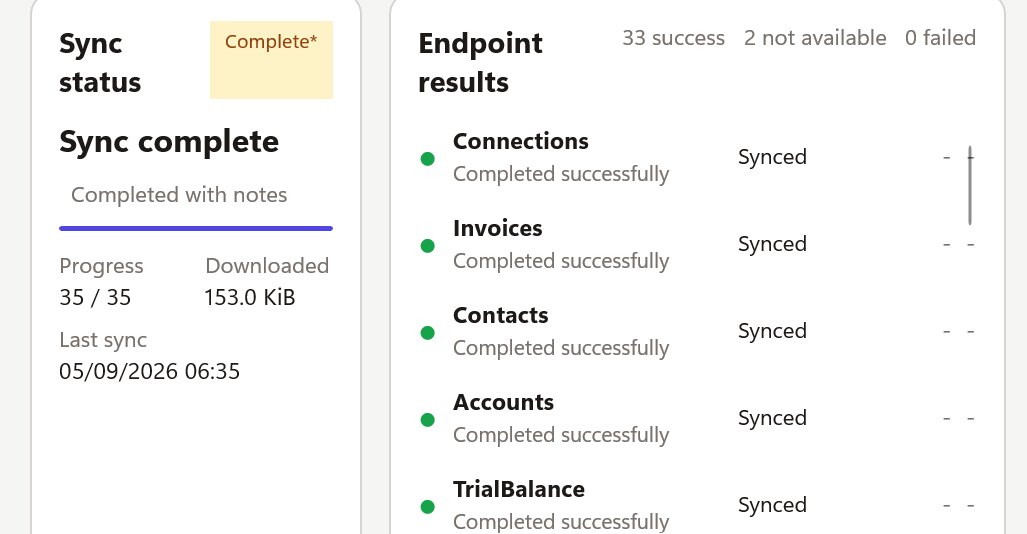
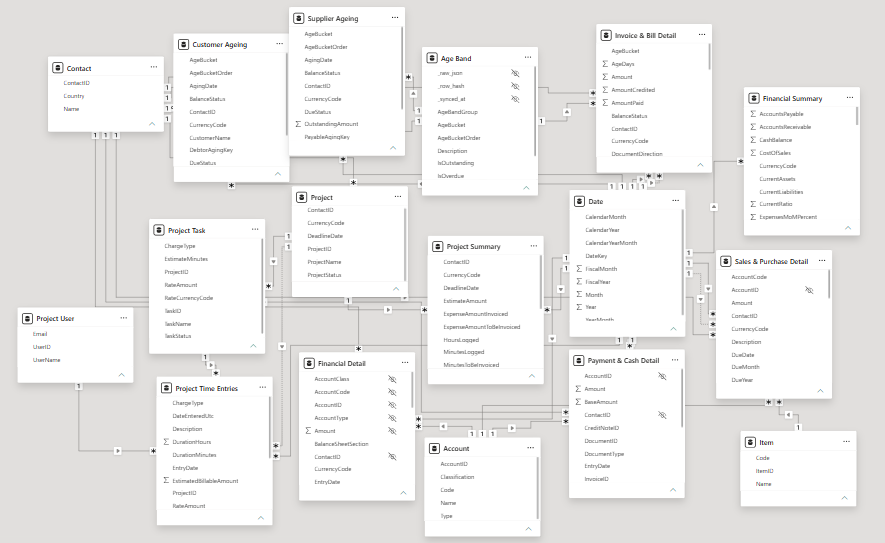
The screenshots below show a completed Xero pull and the resulting downstream star-schema model. They are included so the comparison is grounded in the product rather than a feature checklist alone.
Alternatives and named comparisons
A useful alternative page should say where the other product is stronger as well as where Datplan is different. These comparisons use current public vendor information and Datplan’s current released capability boundaries.
Disclosure: Datplan publishes these comparisons and sells Datplan DataPull. We link to the other vendors’ own current pages and deliberately identify situations where their product is the stronger fit.
Compare Datplan’s prepared Xero reporting warehouse with CData’s Power BI connector, including Import/DirectQuery, queryable access, accounting grain, dashboards and reconciliation.
Datplan vs CData →Compare a focused Windows reporting workflow with Coupler.io’s broad cloud data-integration platform, transformations, scheduled imports and destination ecosystem.
Datplan vs Coupler.io →Compare a prepared customer-controlled Xero reporting copy with OdataLink’s cloud OData feed, live/on-demand access, broad endpoint coverage and templates.
Datplan vs OdataLink →Compare Datplan’s Xero/QuickBooks file-based workflow with Connectorly’s hosted Xero database, Power BI reports and multi-organisation features.
Datplan vs Connectorly →Compare Datplan with Skyvia’s wider cloud integration platform, OData endpoints and database/warehouse replication options.
Datplan vs Skyvia →Custom or self-hosted routes can give engineering teams broader destination control. The trade-off is ownership of authentication, schemas, transformations, monitoring, reconciliation and upgrades.
Capabilities and commercial terms change. Each dedicated comparison page states its review date and public evidence sources.
A different privacy choice
Datplan does not require your business data to be stored in a Datplan-hosted warehouse. Keep the output local or deliberately publish it to a network/server or shared location you control.
This is particularly relevant when reporting includes sensitive financial, student, client, care or operational information and the organisation wants to minimise unnecessary third-party copies. See why Datplan was built this way →
Architecture questions
Not for the Datplan workflow. Datplan prepares supported reporting data in the customer’s Windows environment and can publish completed outputs to local, network/server or customer-chosen shared locations. A managed cloud warehouse may still be appropriate when an organisation wants centrally hosted infrastructure or direct cloud querying.
No. It prepares stable local files, fact-and-dimension tables and setup guidance. The first Power BI model setup is manual, and Power BI Service refresh requires a separate Microsoft-supported access or gateway arrangement.
Manual exports can work for occasional small jobs. Datplan is intended for repeatable API pulls, consistent table preparation, run evidence, scheduling, controlled full re-pulls and saved dashboard workflows.
The Windows app is free to download and includes Datplan Demo data, so you can test sync, dashboards, reporting grains and exports first.