Xero
Scheduled accounting reporting data
Refresh the supported Xero reporting grains and write stable files for financial analysis, management reporting and external BI modelling.
Xero to Power BI →Automated source refresh and reusable BI files
Use Datplan schedules to refresh supported source data and write stable reporting files for Power BI, Tableau, Qlik or your own analysis. The source pull and the BI-platform refresh remain separate, visible stages.
One repeatable pipeline
Automate the repetitive extraction and preparation work while keeping the downstream BI model under your control.
Scheduled reporting in the app
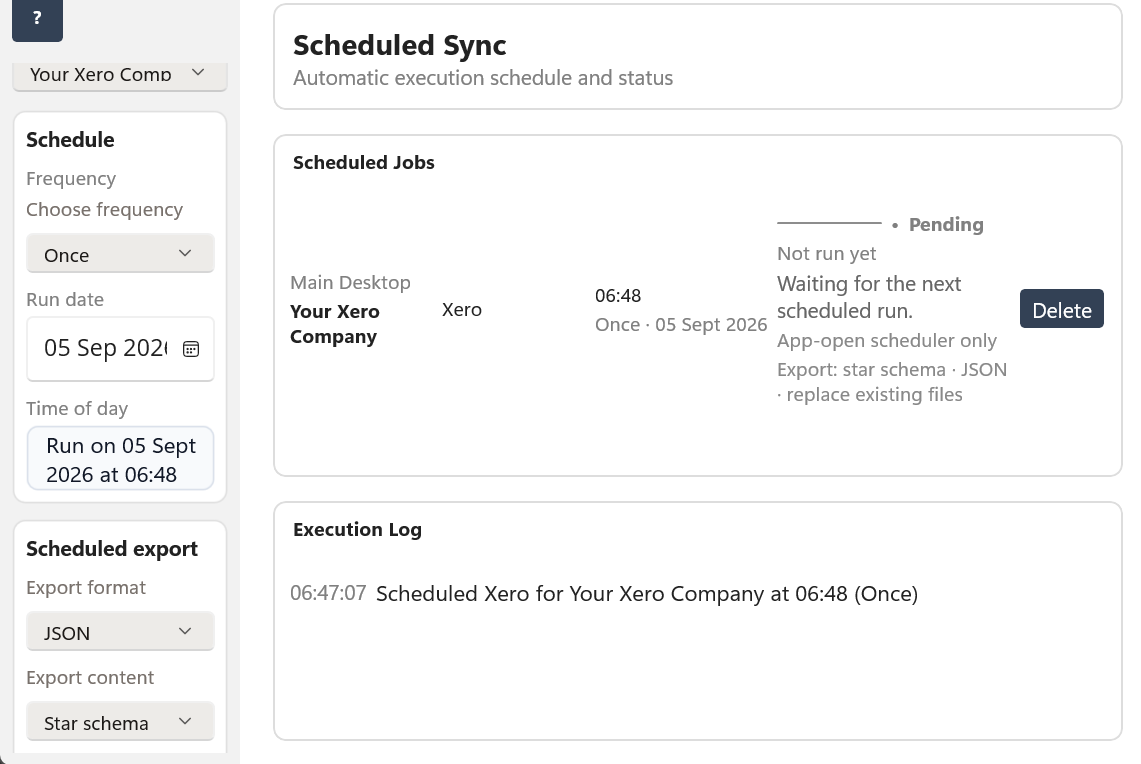
This Datplan example shows a one-time Xero job with a scheduled star-schema JSON export. The same scheduling surface makes the source, timing and export choice visible before the job runs.
Supported reporting routes
Xero
Refresh the supported Xero reporting grains and write stable files for financial analysis, management reporting and external BI modelling.
Xero to Power BI →QuickBooks Online
Refresh supported QuickBooks reporting tables and reuse the prepared fact-and-dimension files in a Power BI, Tableau or Qlik model.
QuickBooks to Power BI →TallyPrime
Run supported TallyPrime acquisition and publish stable reporting files when the Windows PC, TallyPrime company and plan are available.
TallyPrime reporting →HubSpot
Refresh supported HubSpot companies, contacts, deals and activity reporting data so commercial teams can analyse CRM performance in an external BI model.
HubSpot to Power BI →Why this is useful
Datplan's scheduled output is not limited to a Datplan dashboard. A team can use the prepared files as the input layer for Power BI, Tableau, Qlik, Excel-based processes or its own controlled analysis. That is useful when the organisation already has a BI estate or needs to combine source data with other internal datasets.
Combine business questions
For organisations using both an accounting platform and HubSpot, the downstream BI model can bring prepared datasets together under the organisation's own modelling rules—for example pipeline and deal activity alongside actual financial outcomes.
Refresh responsibilities
Check the scheduled execution, provider authorisation, source limits and the completed Datplan run before assuming the BI report is at fault.
Confirm the expected BI files were written to the stable folder and, for a synced location, that the operating system's sync client has completed its work.
Power BI Service, Tableau or Qlik uses its own credentials, gateway or storage access. A successful Datplan run does not guarantee that a later cloud BI refresh also completed.
Scheduled BI questions
Datplan supports once, daily, weekly and monthly scheduling, subject to the selected source plan, provider or local-source availability, usage limits, Windows availability and output folder.
No. Datplan updates the source data and reporting files. Power BI Service has its own refresh job and needs an appropriate route to the files, such as organisation-controlled storage or a supported gateway configuration.
Yes. The export destination can remain local. If a team needs shared access, choose a Windows-accessible network or synced location controlled by the organisation.
No. HubSpot keeps its own CRM grains such as companies, contacts, deals and activities. Datplan prepares source-specific tables; the downstream BI model decides whether and how different sources should be combined.
Start with the scheduler and BI export help, then point your existing reporting model at a stable folder.