Keep it local
Use the prepared Datplan dataset and dashboards on the Windows machine. Previously pulled data can remain available for local reporting when internet access is unavailable.
Accounting and CRM data warehouse
Datplan automatically prepares source-specific facts and dimensions in your Windows environment. Keep the completed reporting copy local, publish it to a network/server location, or deliberately place it in a shared environment you control.
Reviewed and updated 1 October 2026
Pay for the reporting work you need, not for rebuilding the same extraction and preparation steps every month. The opportunities below apply where the supported Datplan workflow replaces work or services you would otherwise pay for.
| Opportunity | Work or cost that may be avoided | What still needs budgeting |
|---|---|---|
| Avoid a bespoke source-data pipeline | For supported sources, DataPull handles authorised extraction and prepares reporting tables, reducing the need to commission and maintain separate authentication, pagination and transformation scripts. | Unsupported endpoints, bespoke integrations and specialist transformations can still require development. |
| Start with prepared accounting tables | Facts, dimensions and source-specific reporting definitions reduce the work of designing a model from raw exports. A ready-made dashboard may avoid a separate data-architecture engagement for that reporting task. | Accounting review remains necessary. Custom consolidation, mappings, governance and a bespoke Power BI model can still require a specialist. |
| Use dashboards without another BI publishing project | When the supplied browser views answer the question, use them rather than building and publishing the same report again in Power BI or a new client portal. | Datplan does not replace every Power BI capability. Any separate Power BI workflow retains its Microsoft licensing and setup requirements. |
| Reuse storage you already have | Keep completed reporting files local or on a permitted network share; use an authorised OneDrive/SharePoint folder for the existing Microsoft-sharing workflow. No separate Datplan-hosted SQL reporting warehouse is required. | OneDrive is cloud storage, not a no-cloud option. Existing licence rights, capacity, permissions and any additional storage costs still apply. A network folder is not automatically accessible over the internet. |
| Reduce repeated export and spreadsheet preparation | Stable files and supported schedules can replace repeated manual downloads, cleanup and file replacement. Refresh the source, publish completed files and then refresh the report. | The Windows device, source access and selected plan must support the workflow. Scheduled execution and downstream refresh still need checking. |
| Spend review time on the records that matter | Reusable views, filters and audit evidence help reduce repeated report requests and the work of writing the same screening rules from scratch. | Indicators do not prove fraud or quantify prevented losses. Reviewer judgement, source documents and follow-up remain essential. |
Potential monthly cash saving = spending genuinely avoided or reduced − Datplan subscription − any extra storage, licensing, device and support costs. Record one-off setup separately. Hours released are useful capacity, but are not automatically a payroll saving.
Illustration, not a customer result: avoiding four paid contractor hours at £25 per hour would avoid £100 of cost in a month, before Datplan and additional costs. If those four hours are salaried time with no reduction in spending, describe the benefit as four hours available for other work—not £100 of cash saved. Replace these assumptions with your own measured figures.
Do not count the same saved hours twice under export, modelling and reporting. Compare the same sources, companies, report coverage and refresh frequency. Retain your source-system licence, security controls and backups.
Compare current source plans · Explore ready-made dashboard templates
Storage and BI terms: Microsoft OneDrive sharing · Power BI licence requirements. Existing subscriptions, storage quotas and organisational policies still apply.
Datplan automatically creates a prepared reporting layer from supported source data: source-specific facts, dimensions, relationships, validation controls and stable reporting files. The processing happens in the customer’s Windows environment. Datplan does not require that reporting dataset to be stored in a Datplan-hosted SQL warehouse.
This page uses reporting data warehouse to describe that prepared analytics layer. Datplan is not advertising a hosted SQL endpoint, ODBC service or DirectQuery endpoint.
Customer-controlled architecture
The source pull, local storage, ETL and validation happen in the Windows environment running Datplan. After a successful run, you decide where completed reporting outputs are published.
Use the prepared Datplan dataset and dashboards on the Windows machine. Previously pulled data can remain available for local reporting when internet access is unavailable.
Publish stable reporting files to an accessible shared folder when the Windows account running Datplan has permission to write there.
If you deliberately choose a synced OneDrive or SharePoint destination, Microsoft stores that reporting copy under your organisation’s Microsoft permissions. It is not stored by Datplan.
What the prepared warehouse looks like
Datplan’s reporting warehouse is not an invisible vendor-hosted database. The prepared facts, dimensions and model metadata are visible in the customer-controlled output, and downstream tools can model those files explicitly.
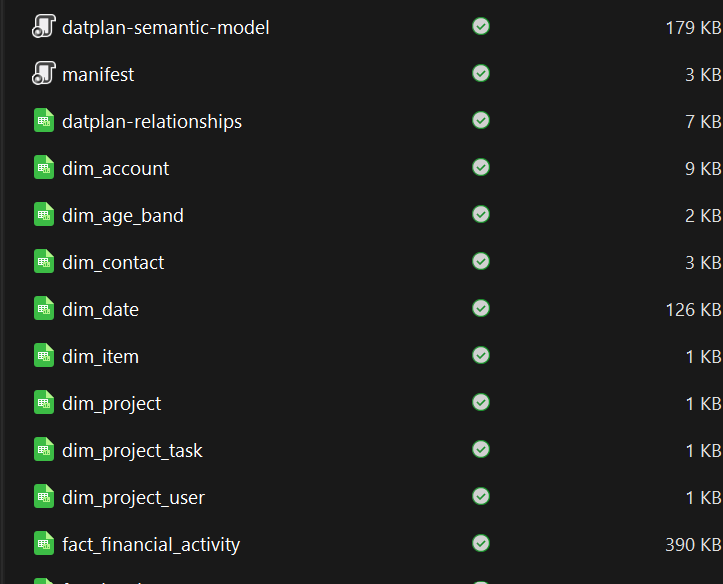
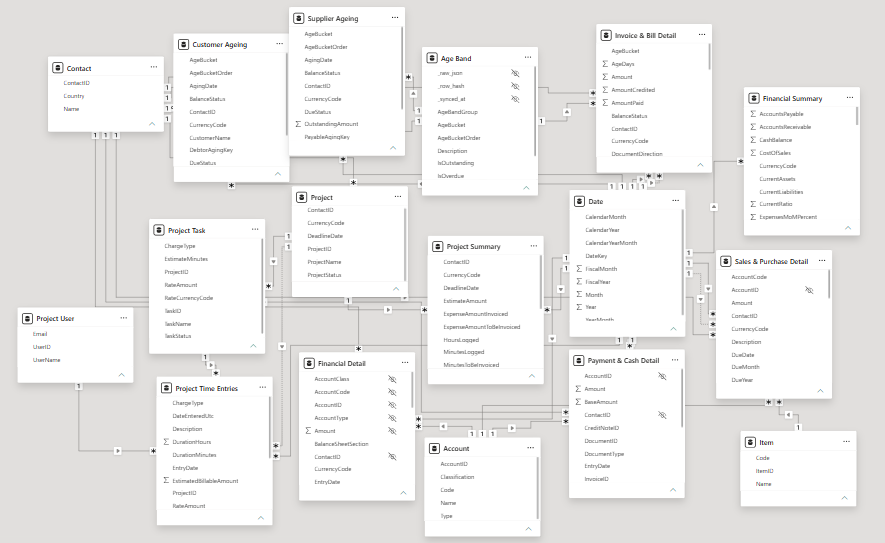
The Power BI screenshot shows a downstream model using the exported star schema. For supported semantic models Datplan can also include a customer-data-free .pbip starter; Qlik CSV exports can include a guarded QlikView/Qlik Sense .qvs load script. Tableau uses the stable files and relationship guidance. None of these imply a live SQL, ODBC or DirectQuery endpoint.
Xero data warehouse
Financial statements, account activity, invoice headers, invoice lines and payments have different grains. Datplan keeps those reporting shapes separate so a convenient join does not silently change the accounting meaning.
| Xero reporting need | Datplan reporting shape | Why it stays separate |
|---|---|---|
| Profit & loss and balance-sheet reporting | Financial Summary | Provider-report totals are not interchangeable with invoice sales. |
| Account and tracking activity | Financial Activity | Detailed movement and statement totals answer different questions. |
| Invoice or bill totals | Invoice Summary | Header amounts must not be repeated once per line. |
| Product, tax or tracking detail | Invoice Lines | Line-level analysis needs line-level measures. |
| Settlement timing | Payments | Cash settlement timing is not the same as recognised revenue. |
See current Xero coverage → · See the Xero to Power BI workflow →
QuickBooks data warehouse
Datplan keeps document, line, payment, ageing, inventory and provider-report financial-summary data at their intended grains. Profit & Loss and Balance Sheet KPIs should be reconciled to the provider-report output rather than rebuilt casually from transaction lines.
See current QuickBooks coverage → · See the 2026 Power BI migration route →
TallyPrime data warehouse
Datplan keeps financial-report periods and snapshots separate from voucher headers, ledger lines, sales and purchase documents, item lines and inventory movements so reporting does not flatten different accounting grains into one table.
See current TallyPrime reporting → · Open the TallyPrime sample dashboards →
HubSpot reporting warehouse
A reporting warehouse is useful only if it preserves what each row means. Datplan keeps CRM entities and activity facts separate instead of flattening every relationship into one table.
One £10,000 deal linked to three activities is still a £10,000 deal. A naive flattened table can repeat the deal value three times. Datplan’s reporting model keeps those facts distinct so Power BI can answer pipeline and activity questions without multiplying the commercial value.
Why organisations choose this architecture
Every copy of sensitive data creates another environment, permission model and set of credentials that must be secured. Datplan was designed so a Datplan-hosted copy is not required for the reporting workflow.
For learning and training organisations, sensitive student reporting may be a reason to keep the reporting copy within infrastructure the organisation controls. This is an example of the architecture, not a customer case study.
Healthcare and care environments can use the same approach when organisational policy or risk assessment favours keeping reporting copies of sensitive service-user or patient-related information inside controlled infrastructure.
Financial transactions, customer and supplier information and audit evidence can also be commercially sensitive. Datplan lets the organisation decide whether the completed reporting copy remains local or is deliberately shared elsewhere.
Local processing is not a substitute for endpoint security, encryption, access control, backups or regulatory compliance. It reduces one optional dependency: a Datplan-hosted business-data warehouse.
What the customer controls
Datplan’s default processing path keeps the pulled source dataset and ETL inside the Windows environment. That does not prevent an organisation from choosing cloud collaboration later. A finance team might keep month-end reporting on a local or network location. A consultancy might deliberately publish a completed client reporting pack to a controlled OneDrive or SharePoint folder. In both cases, Datplan performs the preparation before that publication choice is made.
Reporting continuity
After a successful sync, Datplan can report from the data already prepared in the Windows environment. That can support offline analysis and provide a secondary reporting copy of the fields that have been pulled.
The Datplan dataset is a reporting copy of supported fields, not a complete backup of Xero, QuickBooks, HubSpot or any other source. Keep the source system’s own backup, retention and disaster-recovery controls in place.
Compare architectures
| Question | Datplan | Typical hosted warehouse/integration service |
|---|---|---|
| Where does extraction/ETL happen? | Customer’s Windows environment | Usually vendor-managed cloud infrastructure |
| Does Datplan host the business-data warehouse? | No | Depends on the provider |
| Where can the completed reporting output live? | Local, network/server share, or a customer-chosen shared/cloud destination | Provider/destination dependent |
| Reporting model | Source-specific facts, dimensions, grain and validation | Varies by service |
| Offline use | Completed local Datplan data can be used for local reporting | Depends on the service and report cache |
Compare Datplan with other connector and integration approaches →
The Windows app is free to download and includes Datplan Demo data, so you can inspect the reporting workflow, dashboards, grains and exports first.